Sub-Agents
Fermi can spawn parallel sub-agents within a session. Each sub-agent has its own context window and tool access, runs concurrently with the main agent, and reports results back when finished.
Each sub-agent gets a dedicated tab in the TUI. Click the agent’s name in the main conversation or use Opt+←/→ to switch between tabs. The sub-agent’s full conversation — tool calls, diffs, bash output — is visible in its own scrollable view.
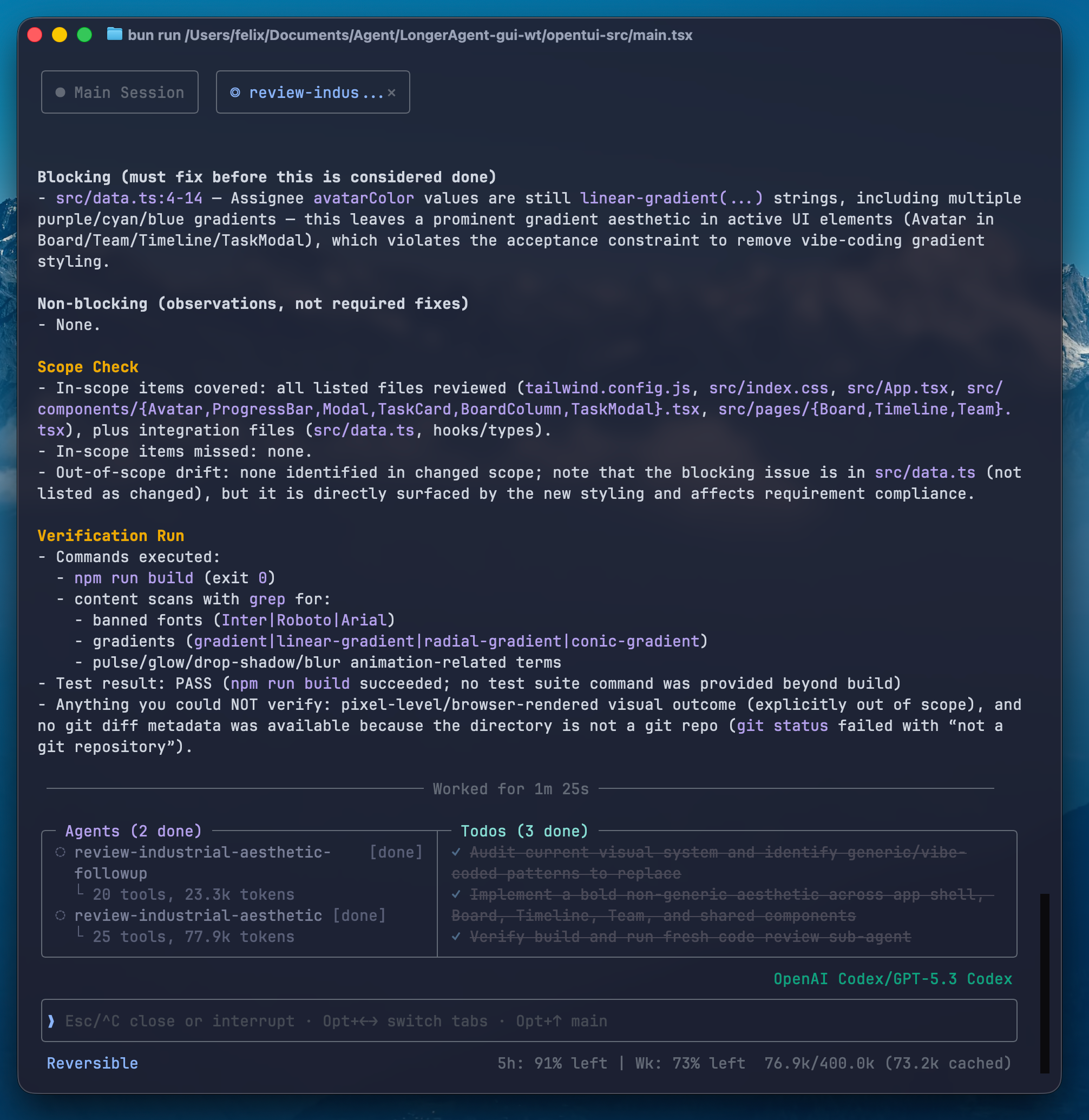
How It Works
Section titled “How It Works”- The main agent calls
spawnto create a sub-agent with a task. - The sub-agent runs in its own context, executing tools and producing output.
- When it finishes, its result is delivered back to the main agent.
- The main agent synthesizes results and continues.
The spawn Tool
Section titled “The spawn Tool”spawn(id, task, mode, template?, template_path?, model_level?)| Parameter | Required | Description |
|---|---|---|
id | Yes | Unique agent ID |
task | Yes | Task description |
mode | Yes | oneshot (single turn, returns result) or persistent (stays alive, receives messages) |
template | No | Built-in template: explorer, worker, reviewer |
template_path | No | Path to a custom template directory (relative to the session’s artifacts dir) |
model_level | No | high, medium, or low — selects from user-configured tiers (omit to inherit the parent’s model) |
Templates
Section titled “Templates”Three templates are spawnable via the spawn tool’s template parameter:
explorer
Section titled “explorer”Read-only (read_only tool tier). Can read files, search, grep, and browse — but cannot edit files or run destructive commands. Use for investigation, code review, and research.
worker
Section titled “worker”General-purpose agent with file editing and shell access (reversible tool tier). Use for implementation work.
reviewer
Section titled “reviewer”Reviews changes made by another agent with fresh-eyes context (reversible tool tier). Runs tests, checks scope, and returns a structured verdict. Use for code review and correctness checks.
A fourth template, main, is the primary-agent template (the top-level agent you talk to). It is not a spawn target — sub-agents use explorer, worker, or reviewer.
Agent Modes
Section titled “Agent Modes”Oneshot
Section titled “Oneshot”The agent runs once, produces output, and terminates. The result is delivered to the parent automatically.
spawn(id="auth-check", template="explorer", mode="oneshot", task="Check how auth middleware validates tokens")Persistent
Section titled “Persistent”The agent stays alive after its initial task. The parent can send follow-up messages via the send tool. Useful for long-running coordination.
spawn(id="monitor", mode="persistent", task="Watch the build output and report errors")send(to="monitor", content="The build started — check for type errors")Model Tiers
Section titled “Model Tiers”Sub-agents can run on cheaper/faster models via the model_level parameter. Configure tiers with the /tier command:
/tierThis opens a picker where you assign specific models to high, medium, and low tiers. Then when spawning:
spawn(id="scout", template="explorer", mode="oneshot", model_level="low", task="List all .ts files in src/")The sub-agent uses the model assigned to the “low” tier — saving cost on simple tasks.
Orchestration Tools
Section titled “Orchestration Tools”| Tool | Description |
|---|---|
spawn | Create a sub-agent with inline parameters |
send | Send a message to a persistent child agent |
kill_agent | Kill one or more running sub-agents by ID |
check_status | View sub-agent status and background shell status |
await_event | Pause until a runtime event arrives or timeout expires |
Custom Templates
Section titled “Custom Templates”Add new templates by placing directories in ~/.fermi/agent_templates/:
~/.fermi/agent_templates/└── my-custom-template/ ├── agent.yaml └── system_prompt.mdUser-global templates can only add new templates — they cannot override the bundled explorer / worker / reviewer / main templates (a directory that collides with a bundled name is skipped). To override a bundled template, place it in project-local .fermi/agent_templates/ (in the project root), which takes highest priority.
Practical Tips
Section titled “Practical Tips”- Use
explorerfor investigation. When you want the agent to look at something without changing it — safer and uses less context. - Use
model_levelto save cost. Simple tasks (file listing, grep) do not need the most expensive model. - Prefer
oneshotmode unless you need ongoing interaction with the sub-agent. - Let the main agent decide. Describe what you want done — the agent chooses when to spawn, how to split work, and which template to use.
- Check progress by asking the main agent. It will use
check_statusto report back.